_edited.png)
How to Add a Website Manager to Your Site

Sometimes you need another person to help manage your website. Maybe it's a team member, a family member, or someone like us helping you with updates.
The good news is WIX makes this simple. You can give someone access to your site without ever sharing your personal login.
Here's how to add a website manager, step by step.
Steps to Add a Website Manager
Login to WIX and scroll down to Settings in your dashboard.
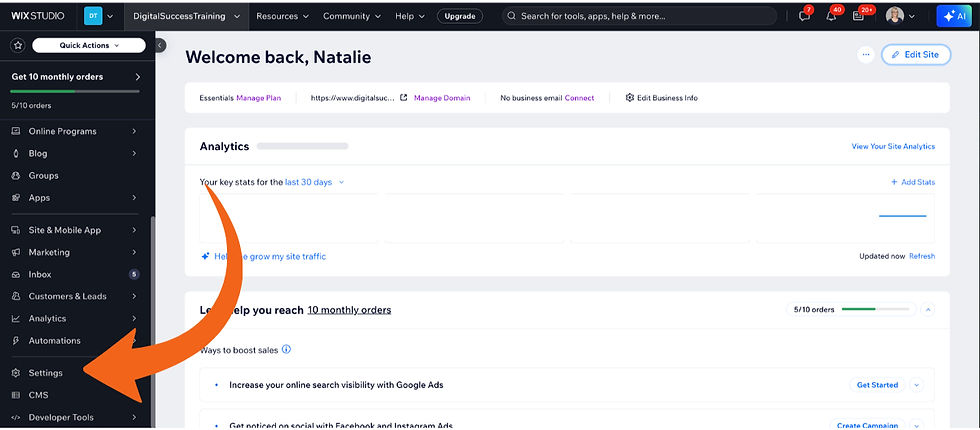
Click on Settings.
Type "roles" into the search bar.

Click on Roles and Permissions.

Click on the blue Invite Collaborators button in the top right corner.

Type the email of the person you are inviting.

Click on the role you want them to have. In this case, that's Website Manager.

Click on the blue Send Invite button in the top right corner.

That's it!
The person you invited will get an email. Once they accept, they'll have access to the backend of your website.
A Quick Note on Roles
A Website Manager can make most changes to your site. If you only want someone to see analytics or manage blog posts, WIX has other roles you can choose instead.
You're always in control. You can remove someone's access anytime from the same Roles and Permissions page.
Final Thought
Adding help to your website doesn't mean giving up control. It just means you don't have to do everything yourself.
Need Help Building or Updating Your WIX Website?
If you're unsure where to start or feeling stuck, you don't have to figure it out on your own. Support is available when you need it.
Here's to your digital success ... one simple step at a time.


